
The GreenLeaze module injects buttons on the product page, cart page, or cart drawer.
You have two ways to indicate where the buttons should appear:
The GreenLeaze module injects buttons on the product page, cart page, or cart drawer.
(On some websites, prices may not update correctly in the cart drawer — we are working on a solution to fix this.)
You have two ways to indicate where the buttons should appear:
-
By specifying a container selector in the module configuration
Go to your product or cart page and find where you want the buttons to appear.
Right-click on the container and select “Inspect” in your browser.
You’ll see the container selector in the console. Copy the selector and paste it into the module configuration.For example, the container may be
.wc-proceed-to-checkout, to inject the button like this: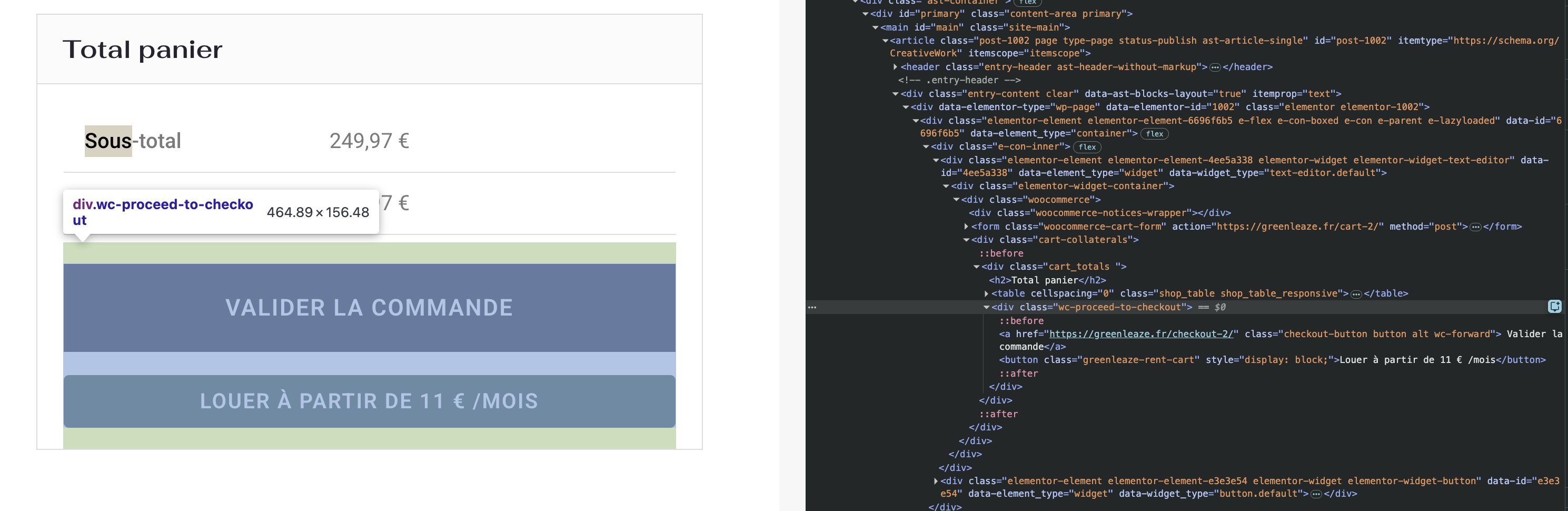
-
By adding a button manually to the product or cart page
You can add a button with the class
greenleaze-rent-carton the cart page,
greenleaze-renton the product page, or
greenleaze-rent-drawer-cartin your cart drawer.
These buttons will automatically be recognized and used by the module as GreenLeaze buttons.